


Send & Receive Fax Number
4.7432.00 Reviews
App Specs
- Version
- 1.41
- Updated On
- License
- Free
- Downloads
- 100,000+
- Developer
- AutoBizLine, Inc.
- Categories
- Communication
- Platform
- Android
Screenshots
 Analysis by AppCompare
Faxing from a phone sounds useful until you need to send a real document and discover that convenience depends on a few practical details: whether the page is legible, whether the recipient accepts fax, and whether you need to keep a copy afterward. I see Send & Receive Fax Number as a tool for those occasional, deadline-driven moments rather than a replacement for every kind of document sharing. It is a communication app from AutoBizLine, Inc., and its central appeal is straightforward: handle faxing from a mobile device instead of finding a physical machine.
Where the app fits today
The app is free to install, has an Everyone content rating, and offers in-app purchases ranging from $1.99 to $99.99 per item. That makes it easy to try, but I would not treat “free” as a promise that repeated faxing will cost nothing. Before relying on it for a regular workflow, I’d check the purchase options in the app and work out whether the expected cost makes sense for how often I send or receive documents.
Its current version is 1.37, and the app was released on January 24, 2024. Those facts give a useful point of reference, but a version number alone does not tell me what changed or how frequently the product has evolved. I’d judge it by the tasks it can handle for me now, while treating future improvements as possibilities rather than guarantees.
Who gets the most value
I’d consider it for a freelancer sending a signed form, a small business that occasionally receives paperwork by fax, or someone dealing with an organization that still asks for faxed documents. It is especially appealing when the alternative is a detour to a print shop or office machine for a single time-sensitive page. If faxing is part of your daily workload, though, compare the ongoing cost and document-handling process with a dedicated business service before making this your main channel.
It is also not the right choice simply because a document contains a signature. If the recipient accepts a secure electronic signing service, email, or an online portal, those options may be simpler and easier to track. Fax is most useful when the other party specifically needs it or when its existing process depends on it; the app cannot make a recipient’s fax requirement disappear.
Getting Started with Send & Receive Fax Number
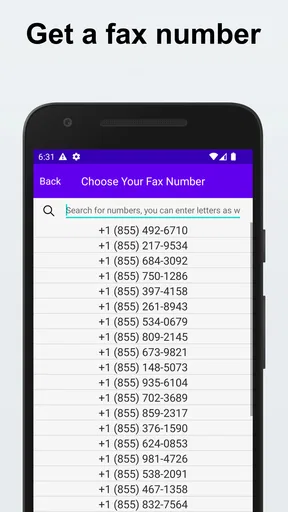
First things first, downloading and setting up the Send & Receive Fax Number app is a breeze. It’s available on both Android and iOS platforms, so you can find it on the Google Play Store or the Apple App Store. Once installed, you’ll find the user interface to be clean and straightforward. The app guides you through setting up your account, and you can choose a local or toll-free fax number, which is pretty cool.
How It Works
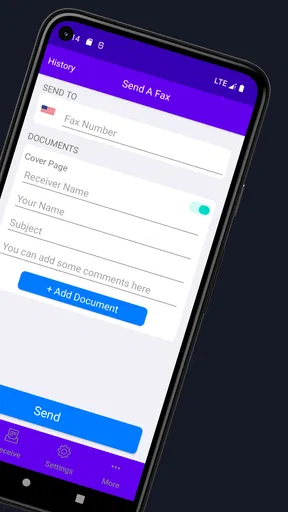
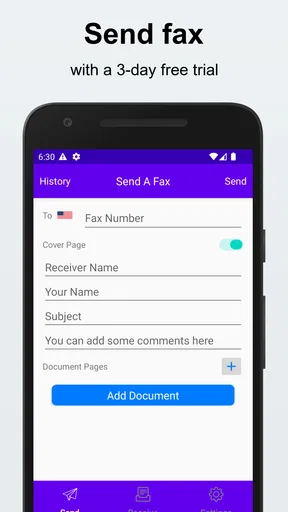
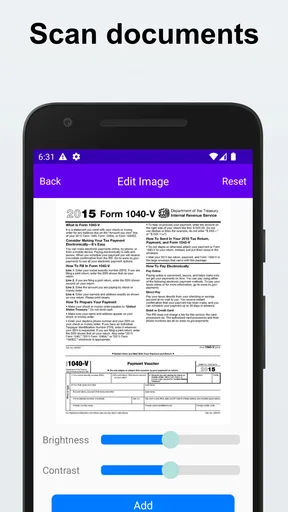
Now, let’s talk about the nitty-gritty. The app is designed to handle both sending and receiving faxes. To send a fax, you can simply snap a photo of the document with your phone’s camera or import files from cloud services like Google Drive or Dropbox. The app supports various file formats, including PDF and JPEG, ensuring you have flexibility in your document handling.
Worth Reading Before You Choose

EA SPORTS FC Mobile 26 Is a Bigger Football Game, but It Takes Time

Flipboard Shows What News Apps Must Do Beyond the Feed

Switching to Android Auto Means Rethinking Your Driving Routine

Google Calendar Makes a Crowded Week Easier to Manage

Ludo King Makes the Most of the Minutes Between Plans

Baby Panda World Brings Quick Play to Modern Phones, but Its Game Library Feels Busy
For a paper form, I’d take the picture on a flat, well-lit surface, check that all four edges are visible, and zoom in before sending. That small pause matters more than it might seem: a shadow, curled corner, or cropped signature can turn a quick mobile task into a request to send the page again. If the original is already a clean PDF, importing it is usually the more dependable route than photographing a screen or printout.
A practical workflow is to prepare the complete document first, then send it as one organized file rather than treating each page as a separate job. I’d double-check page order and make sure any supporting pages are included before entering the recipient details. This is a useful habit for forms with instructions on the back or attachments, where a technically successful transmission can still be incomplete from the recipient’s point of view.
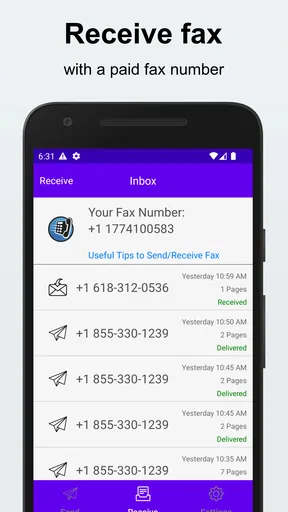
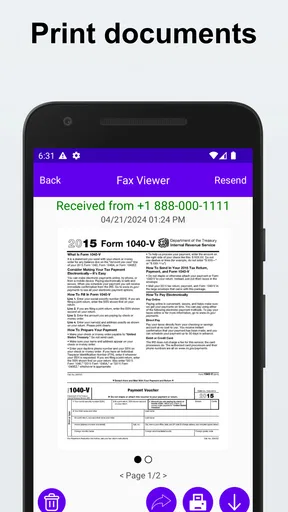
Receiving faxes is just as seamless. You’ll get a notification when a fax comes in, and you can view it directly within the app. The received documents are stored securely, and you can share them via email or other apps with just a few taps.
A realistic day-to-day use
Imagine I’m away from my desk when a service provider asks for a signed authorization form before processing a change. I can photograph the completed pages, inspect the image for readability, and send them without looking for a machine. If a reply arrives later, having the number and incoming document in the same fax workflow can be more convenient than coordinating a separate office line. I’d still keep an eye on the notification and open the received pages promptly; a notification is only useful if I verify that the document is readable and complete.
For someone who receives paperwork intermittently, the choice of a local or toll-free number can also affect how comfortable it feels to share that contact detail. I’d choose the number with the people who will be sending documents in mind, and use it consistently on forms where a return fax is expected. If you only need to send one page once, setting up a number may be more process than the task warrants; if you expect replies or repeat use, it can make the workflow more coherent.
Features Worth Highlighting
One of the standout features of this app is its ability to sign documents digitally. No more printing, signing, and rescanning. You can add your signature directly on the app, saving time and paper. Plus, if you’re dealing with sensitive information, the app ensures a secure transmission with encryption protocols.
Even with a digital signature, I’d take care to review the final document before sending it. Check that the signature is placed on the intended line and that it has not obscured nearby text. For a form that needs initials on multiple pages, go through every page rather than assuming one signature completes the job. This is a small but important quality check, especially when the recipient may not contact you immediately about a missing mark.
The app also offers a handy archive feature. You can easily organize your sent and received faxes, making it a breeze to locate past documents. This is particularly useful for businesses that need to keep track of their communications.
I’d use that archive as a working record, not as the only copy of an important file. For a contract, claim, or signed authorization, keep the original document in the storage system you already rely on, and use the fax history to find the transmission when needed. A practical naming routine—such as including the recipient and purpose in the file name before importing—can also make later retrieval easier, especially when several similar forms arrive close together.
How it compares with other ways to fax
Compared with a physical fax machine, a phone-based app avoids being tied to a particular office, paper tray, or machine. That is a real advantage for a one-off form or for people who work from different places. A traditional machine may still suit an office that sends and receives high volumes, where several staff members share a line and established filing procedures matter more than mobile access.
Compared with a general scanning app, this one is aimed at completing the fax task rather than merely making a digital copy. A scanner app can be the better fit if the recipient accepts email or an online upload and you do not need a fax number. Conversely, if you need both to send documents and to receive them at a chosen fax number, a scanning-only tool does not cover that whole job. I’d choose based on the recipient’s requirement, not on the assumption that fax is automatically the most convenient format.
There is also a useful distinction between occasional and routine use. For a rare fax, the mobile workflow can save a trip and avoid maintaining equipment. For steady business traffic, the purchase range and the need to manage records deserve a closer look; a service designed around a team’s recurring volume may be easier to budget and administer. The right choice depends less on the novelty of faxing by phone than on how often you do it and who needs access to the documents.
User Experience
In terms of user experience, Send & Receive Fax Number is top-notch. The app runs smoothly without any noticeable glitches. The design is intuitive, making it easy for anyone to navigate, even if you’re not tech-savvy. The customer support is responsive, and there’s a comprehensive FAQ section within the app to help with any common queries.
The app has an average rating of 4.6 from around 3.3 thousand ratings, alongside 311 written reviews, and it has over 50 thousand installs. Those figures suggest that many people have tried it, but they cannot tell me whether its costs or workflow suit my particular use. I’d treat them as background when deciding whether to try it, then pay closer attention to the steps and purchase choices that appear in my own account.
Before sending something important, I’d do a low-stakes test if I have a suitable recipient and document. That gives me a chance to understand the sequence, confirm where sent items appear, and learn how the number setup works before a deadline is involved. It is a better way to judge whether the interface feels comfortable than waiting until a time-sensitive form is on the line.
What to consider before relying on it
The biggest limitation is not unique to this app: faxing still depends on clear source pages and on the other party’s process. A mobile camera can capture a page well, but it does not guarantee a readable transmission if the lighting is poor or the form is faint. Likewise, receiving a fax on a phone is handy, but you still need to decide where to keep sensitive documents and who may see them when you share them through another app.
I would also avoid assuming that choosing a fax number means every recipient will accept it for every purpose. If a form has specific submission instructions, follow those instructions and check that fax is an approved route. For documents with strict deadlines, leave time to inspect the result and respond if the pages need to be sent again rather than treating a tap on “send” as proof that the task is finished.
The app’s current version, 1.37, is a concrete marker of its present release, not evidence by itself of a particular improvement. For existing users, the useful question is whether the version they have continues to handle their own send-and-receive routine. I’d look for clear release information when considering an update and avoid counting on a feature or change until it is actually available in the app.
Why You Might Love It
If you’re someone who occasionally needs to send or receive faxes, this app is a game-changer. It eliminates the need for bulky fax machines and simplifies the process with your smartphone. It’s ideal for freelancers, small businesses, or anyone who values convenience and efficiency.
It may be a poor fit if you never encounter fax requirements, prefer not to create another account or manage another document inbox, or need a predictable high-volume business workflow. In those cases, an existing scanner, a recipient’s portal, or a dedicated office setup may be the more sensible option. I’d also compare the available purchase choices with the number of faxes I expect to handle before turning it into a regular habit.
For someone who does need it, I’d keep a short routine: prepare the pages, inspect the scan, confirm the destination, send, then check the archive and any incoming response. That sequence reduces avoidable errors without making an occasional fax feel like a major project. It also helps separate the convenience of the app from the responsibility of checking that the right document reached the right place.
What I’d watch as it develops
Because the app has a defined current version and a relatively recent release history, I’d pay attention to practical changes that affect everyday reliability: whether setup remains clear, whether managing received documents stays straightforward, and whether purchase options remain understandable before a user commits. Those are expectations to watch, not claims about changes already made. For anyone who already depends on it, a release note that explains a change plainly is more useful than a version number on its own.
I’d also keep my own workflow flexible. If a recipient moves to an online portal or accepts signed PDFs by email, there may be no reason to fax that document anymore. If they still require fax, the app’s value is in making that specific exchange less dependent on a physical machine. That distinction helps keep the tool useful without turning it into the answer to every document problem.
Final Thoughts
In conclusion, Send & Receive Fax Number is a must-have tool for modern communication. It’s efficient, user-friendly, and packed with features that cater to today’s mobile lifestyle. Whether you’re sending contracts, invoices, or any other documents, this app has got you covered. Give it a try, and you might just find it’s the app you didn’t know you needed!
My more measured recommendation is to try it when you have a genuine fax task, then decide whether the number setup, document handling, and in-app purchase options fit your habits. If you occasionally need a fax without access to a machine, it offers a practical mobile route; if fax is not required by the recipient, a direct digital submission may be simpler. That is the distinction I’d keep in mind: useful for a real fax need, but not a reason to fax documents that could be shared more easily another way.
Pros
- Easy setup with a user-friendly interface.
- Supports a wide range of document formats.
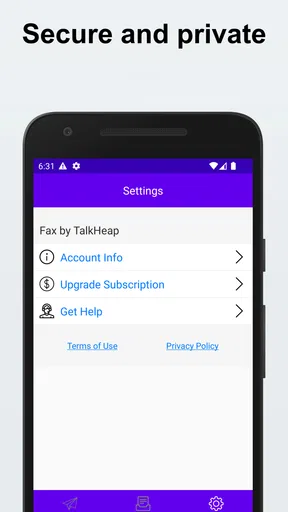
- Secure encryption for sensitive documents.
- Reliable delivery with instant notifications.
- Compatible with both Android and iOS devices.
Cons
- Requires a stable internet connection.
- Subscription needed for full features.
- Limited free faxes per month.
- Occasional delays in delivery.
- No integration with third-party apps.
FAQs for Send & Receive Fax Number
How do I set up a fax number with the Send & Receive Fax Number app?
Setting up a fax number with the app is straightforward. After downloading and installing the app, you’ll be prompted to create an account. Once registered, you can choose a fax number from a list of available options. This number will be linked to your account, allowing you to send and receive faxes directly through the app.
Is the app compatible with both Android and iOS devices?
Yes, the Send & Receive Fax Number app is designed to be compatible with both Android and iOS platforms. You can download it from the Google Play Store for Android devices or the Apple App Store for iOS devices. Ensure your device meets the app's system requirements for optimal performance.
Are there any subscription fees for using the Send & Receive Fax Number app?
The app offers a variety of subscription plans to cater to different needs. While there may be a free trial period, continued use typically requires a subscription. Plans vary based on the number of faxes you can send and receive each month. Review the pricing details in the app to choose the best plan for you.
Can I send and receive international faxes using this app?
Yes, the app supports international faxing. You can send and receive faxes to and from numerous countries. However, it's important to check if international faxing incurs additional charges, as these costs may vary depending on your subscription plan and the destination country.
What file formats are supported for sending faxes through the app?
The Send & Receive Fax Number app supports a wide range of file formats, including PDF, DOC, and JPEG, among others. This flexibility ensures that you can easily send documents directly from your mobile device. Before sending, you can preview the document to ensure it appears correctly.


